How I detected language by country with no manual switcher: the iFace Simulator case
Is it worth detecting a visitor's language by IP geolocation, or is a manual language switcher always more reliable?
By Pietro Fiorillo ·
In this article
The problem: explaining medical-aesthetic training models to different markets
iFace makes physical and digital training models so doctors can practice aesthetic procedures before operating. It needed a site that explained each simulator clearly and worked in multiple languages based on the visitor's country, without forcing them to pick a language by hand.
How each simulator is assembled: lazy-loaded routes, no central registry
There's no config array listing the available simulators. Each one is, literally, one lazy import() line plus one <Route> line in the router.
const R1   = lazy(() => import('./components/R1/R1'));
const Lips = lazy(() => import('./components/Lips/Lips'));
const INose = lazy(() => import('./components/INose/INose'));

<Route path="simulators/r1" element={<R1 />} />
<Route path="simulators/lips" element={<Lips />} />
<Route path="simulators/inose" element={<INose />} />
{/* Models */}
<Route path="models/discovery-model" element={<DiscoveryModel />} />src/App.jsx.Adding a new simulator means adding these two lines, not modifying a module system. It's a simple architecture until the number of simulators grows a lot, at which point a data registry would probably be worth it.
How the site decides which language to show you
The site uses i18next with three complete translation packages: English, Spanish and Portuguese. There's no Italian, even though I speak it: the product specifically targets English, Spanish and Portuguese speaking markets.
import en from './locales/en/translation.json';
import es from './locales/es/translation.json';
import pt from './locales/pt/translation.json';

const resources = { en: { translation: en }, es: { translation: es }, pt: { translation: pt } };

i18n.use(initReactI18next).init({
  resources,
  lng: 'en',
  fallbackLng: 'en',
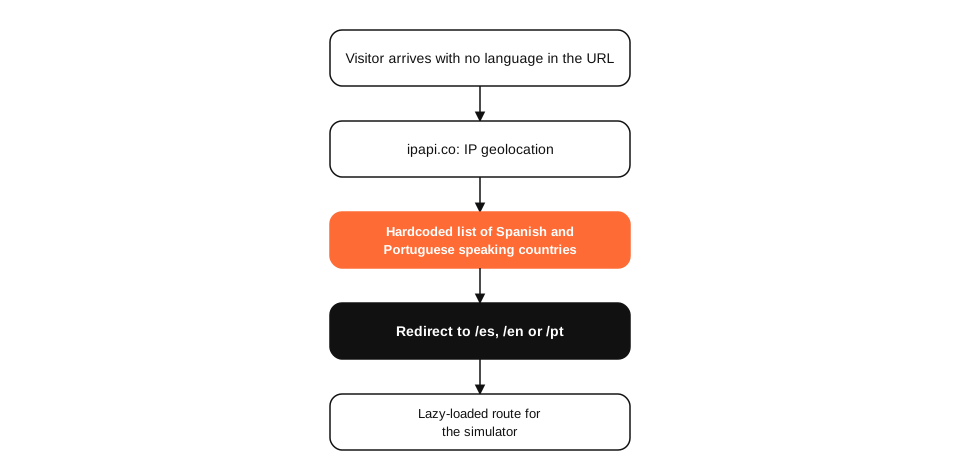
});src/i18n.js.Which language to show doesn't depend on a switcher the visitor picks: a component geolocates the IP with ipapi.co and checks it against lists of Spanish and Portuguese speaking countries written directly in the code. If the country matches, it redirects to /es or /pt; otherwise it stays on /en.
It's not a space simulator platform: it's a store with a simple cart
Each product has a simple cart object, with id, name and price.
{
  cartId: 'r1-simulator',
  cartName: 'R1 Simulator',
  price: 344,
}R1Simulator.jsx.How I validated this architecture
I ran npm run build against the real repository (Vite 7, React 19) and measured the result instead of describing it from memory.
| Metric | Result | Environment / evidence |
|---|---|---|
| Lighthouse Performance (mobile, lab) | 69 / 100 | Lighthouse 13.5.0, simulated throttling |
| LCP (lab) | 5.0 s | Same Lighthouse run, not field (CrUX) data |
| Local build time | 3.39 s | vite build, the fastest in this whole series |
| Export size | 3.7 MB across 129 files | /dist folder generated by that build |
| Languages supported | 3 (en, es, pt) | Real folders in src/locales, no Italian |
| Development commits | 23, from July to August 2026 | The repository's git log |
The build itself warned about a JavaScript chunk over 500KB (index-BEfQztCT.js, 560KB uncompressed), something worth splitting further if the site keeps growing.
A product's language is decided by its market, not by the biography of whoever builds it.
My part in this project
My part in iFace Simulator included frontend development, integrating Sanity as the CMS and the multilingual strategy, as part of my work at MANYA Digital.
What I'd do differently: a public description that didn't match the project
Before writing this article, this project's page on my site described a «space simulator platform» with a «real-time control dashboard». Reviewing the real repository, I found it's actually a marketing and e-commerce site for medical-aesthetic training models, with no dashboard and no real-time data of any kind. I've already corrected that description on the project page; I'm documenting it here because it's exactly the kind of mistake worth admitting instead of letting it slide.
What I'd test next
I'd verify there's a visible manual language switcher for when geolocation gets it wrong (a VPN, for example), and I'd split the 560KB JavaScript chunk the build flagged before the site adds more simulators.
Sources
Frequently asked questions
Why doesn't the site have an Italian version if you're Italian?
Because the product is specifically aimed at English, Spanish and Portuguese speaking markets, not at covering every language I speak. A project's language decisions answer to its market, not to who builds it.
How does the site decide which language to show?
It geolocates the visitor's IP with ipapi.co and checks it against two hardcoded lists of countries (Spanish-speaking and Portuguese-speaking) in the code. If the country is on either list, it redirects to /es or /pt; otherwise it defaults to /en.
What happens if someone uses a VPN?
They'd see the language for the VPN's exit country, not their real one. That's a limitation inherent to any IP-based detection, not specific to this project, and a manual language switcher (if present in the UI) remains the way to correct it.
Is there any dashboard or real-time data?
No. I checked the code for websockets, charting libraries or polling hooks, and found none. It's a marketing and e-commerce site with lazy-loaded routes, not a monitoring platform.
Why Vite and React Router instead of Next.js?
Because the site doesn't need server rendering or hybrid routes: it's a marketing SPA with per-product lazy loading, and Vite gives a simpler, faster build for that use case.
How much does it cost to maintain a site like this?
Hosting for a static SPA is minimal. Content is edited from Sanity with no code changes, so the real cost is the time spent keeping the three languages' translations in sync.